
Mandatory Requirements for UAE Visa and Emirates ID Applications | Checklist 2026

Zahira Shaik
SEO Content Writer
Zahira Shaik is an SEO Content Writer and Published Author specializing in research-based content. She excels at analyzing market trends, regulations, and industry developments… Read more

Tulika Saxena
AVP, Sales & Marketing | IIM Nagpur
Tulika Saxena specializes in business finance, sales strategy, and market positioning. Leads growth and partnerships, ensuring seamless business setup experiences and client success across… Read more


Key Fact: UAE Federal Authority for Identity, Citizenship, Customs and Port Security (ICP) automatically refuses visa applications in case of non-compliant digital photographs according to a strict 600 DPI biometric standard, or when uploaded passport copies do not show all four corners.
Table of contents
- 1. Introduction: Understanding UAE Visa and Emirates ID Documentation Requirements
- 2. Mandatory Photograph Requirements for UAE Visa and Emirates ID Applications
- 3. Mandatory Passport Copy and Document Submission Guidelines
- 4. How to Prepare and Submit Photographs and Documents Through ICP Smart Services
- 5. Common Photograph-Related Issues in UAE Visa and Emirates ID Applications
- 6. How to Resolve Photograph Upload and Amendment Errors
- 7. UAE Visa Application Process: From Company Incorporation to Visa Approval
- 8. Best Practices to Avoid UAE Visa and Emirates ID Documentation Errors
- 9. How Arnifi Supports UAE Visa Documentation and Application Coordination
- 10. Conclusion: Meeting UAE Visa and Emirates ID Documentation Requirements
- Frequently Asked Questions (FAQs)
- References
1. Introduction: Understanding UAE Visa and Emirates ID Documentation Requirements
Visa and identity card applications require compliance with strict biometric rules, which are regulated by federal authorities.
Federal Authority for Identity, Citizenship, Customs and Port Security (ICP) regulates identity checks in the Emirates via its Smart Services website. It is important to have compliant photos and documents to avoid any problems with the application process. Even small errors such as an off-center face shot, wrong resolution of your photograph, non-compliance with passport borders, or failure to apply technical adjustments to your digital photo result in automatic rejection of your application. Compliance with UAE visa photo and Emirates ID photo rules will ensure a quick process from application to approval.
2. Mandatory Photograph Requirements for UAE Visa and Emirates ID Applications
The following physical and digital standards must be satisfied to pass the biometrics tests conducted by the authorities.
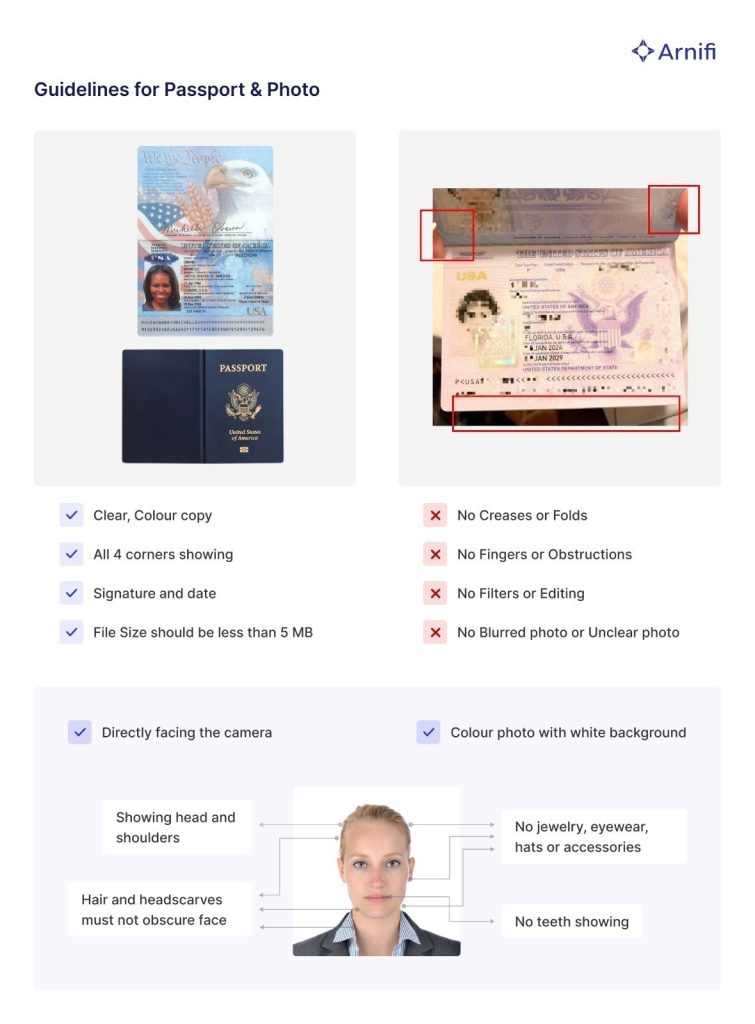
2.1 Digital Upload Specifications (ICP Smart Services)
The digital files uploaded on government portal websites are required to have certain resolution and file size requirements.
- Resolution: Minimum 600 DPI for high digital clarity.
- Digital Pixel Size: Approximately 1016 × 1300 pixels or 827 × 1063 pixels, depending on the portal interface.
- File Format: In colour JPEG format only.
- File Size: Between 1 and 15 MB, although some fields need sharp files not exceeding 240 KB.
- Image Quality: Focused, natural skin colour, no digital filters, zero pixelation, and no ink markings.
2.2 General Photograph and Physical Dimensions
The printed pictures and their corresponding frame sizes should be consistent with standardized measurements.
- Recency: Recent picture, taken within the last six months.
- Uniqueness: Different from your current Emirates ID or passport photograph.
- Printed Dimensions: 35 mm × 45 mm (width × height).
- Face Coverage: Head and shoulders must occupy 70% to 80% of the image frame.
- Head Height: Face height must measure approximately 34 mm from chin to crown.
- Background: Plain, pure white background without patterns, shadows, textures, or borders.
2.3 Facial Expression, Positioning, and Appearance
Maintain a natural look so that accurate face-mapping can be done.
- Have a neutral face with a smile, lips closed (no teeth must be visible).
- Have your head upright and avoid tilting your head in any direction.
- Stare directly at the camera lens.
- Ensure that your eyes are open and visible without hair obstruction.
- Ensure your head and shoulders are visible and properly positioned within the picture frame.
- Ensure your headgear does not cover your facial edges.
- Avoid showing any teeth and wearing glasses, a hat, or any decorative face mask accessories.
- Submit color pictures on a solid white background.
3. Mandatory Passport Copy and Document Submission Guidelines
Proper document format will avoid errors in identity verification during an immigration review.
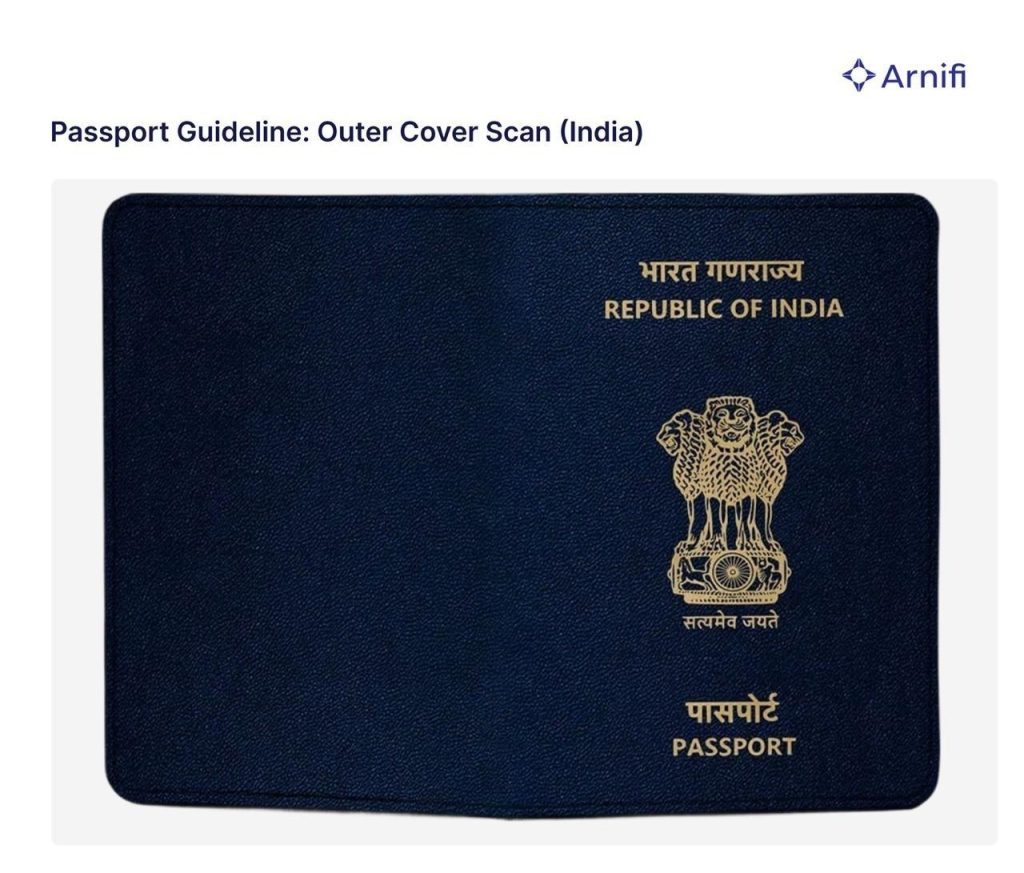
3.1 Passport Copy Specifications
Make a clear scan of your passport to meet UAE visa application document requirements.
- Ensure that you make a full color scan of your passport identification/bio-page.
- Ensure that all four corners of the passport page are visible.
- Make sure all text in the passport, including the passport numbers and MRZ, is legible.
- Include the signature and date stamps of professional partners where necessary.
- Do not exceed a file size of 5 MB.
- Scan original documents directly using a flatbed printer scanner rather than third-party mobile phone applications to avoid watermarks and distortion.
3.2 Personal Identification Documents
Every applicant must prepare their identity documents as follows:
- A recent digital photo in strict compliance with ICP photo criteria.
- High-resolution colour scan of the original passport of the applicant.
- Passport cover page scan as and when required by specific free zone portals.
- Optional: Copy of Emirates ID or any UAE residence visa already held by you.
3.3 Applicant Personal Information
Provide your personal information in line with your records accurately.
- Full legal name of the applicant.
- Full legal names of both mother and father.
- Active primary contact phone number.
- Valid personal email address for application tracking.
3.4 Educational Documents and Attestation Requirements
For certain managerial and professional designations, attested educational qualifications may be required as part of the UAE visa application process.
Degree Attestation Process:
1. Notary Attestation: Obtain initial authentication of the educational certificate from a certified Notary Public in the applicant’s home country.
2. Foreign Affairs Attestation: Get the educational certificate legalised by the relevant Foreign Affairs Department of the applicant’s home country.
3. UAE Embassy Attestation: Submit the document for final attestation at the UAE Embassy in the applicant’s home country.
Important Points:
1. Degree attestation requirements depend on the visa category, professional designation, and applicable authority regulations.
2. Applicants should confirm the attestation requirements before initiating the visa application process.
3. The complete attestation process may take approximately 20 working days, depending on the country of origin and the relevant authorities.
4. How to Prepare and Submit Photographs and Documents Through ICP Smart Services
| Step | Phase | Action Details |
| 1 | Photo Capture | Capture a fresh photograph that meets official UAE passport photo requirements. |
| 2 | Biometric Inspection | Verify that physical proportions, the pure white backdrop, and a straight head angle align with government rules. |
| 3 | Digital Formatting | Adjust image parameters, pixel dimensions, and file size to fit proper JPEG requirements. |
| 4 | Passport Scanning | Scan your original passport bio page in high-resolution colour, ensuring all four corners are visible. |
| 5 | Quality Check | Confirm that no shadows, glare, ink marks, or scanning app watermarks obscure any text fields. |
| 6 | Corporate Validation | Apply required professional partner stamps, signatures, and dates (if applying via corporate channels). |
| 7 | Portal Upload | Upload the formatted photograph and passport files directly to the official ICP Smart Services portal. |
| 8 | Final Review | Double-check all uploaded documents and entered information for accuracy before final submission. |
5. Common Photograph-Related Issues in UAE Visa and Emirates ID Applications
Insight into rejection reasons helps to avoid delays.
5.1 Applicant Submits an Incorrect Photograph
The submission of non-conforming photographs leads to a preliminary examination rejection. It can be a result of wrong digital resolution, a dark background, blur in the face, tilting of the head, or uploading a picture that does not conform to Emirates ID photo rules.
5.2 Photograph Rejection or Request for Resubmission
Glare in photographs, shadows covering the eyes, closed eyes, and teeth being visible cause the rejection of the photo. In case of a request for resubmission of the photograph, the applicant must upload a photograph meeting the criteria.
5.3 Photograph Amendment Not Updated by the Authority
At times, the applicant uploads an amended photograph, but technical problems prevent the portal from updating it. The system continues to show the rejected photograph instead of the new one, often incurring additional costs for the amendment request.
6. How to Resolve Photograph Upload and Amendment Errors
Take the right corrective action to solve upload problems.
6.1 Resolution When the Applicant Submits an Incorrect Photograph
- Study the official rejection letter to find the specific problem with the photo.
- Clearly inform the applicant about the required visual changes.
- Take a new image while observing UAE visa photo size specifications.
- Check the quality, lighting, white background, and size of the image.
- Upload the new photo to the application.
- Keep an eye on your dashboard for any confirmations.
6.2 Resolution When the Authority Fails to Update an Amended Photograph
- Ensure that you have successfully uploaded your changed photo.
- Keep the reference numbers of your applications and uploads.
- Reach out to the support staff of the immigration authority.
- Inform them that your new photo was not updated, although you had made a successful amendment upload.
- Ask them to refresh your account on the portal.
6.3 Supporting Documents and Evidence for Error Resolution
Remember to keep copies of your submissions in case you face any problems in the portal:
- Both original and revised versions of your digital photographs.
- Your application and transaction numbers.
- Correspondence between you and the technical support of the portal.
- Print-outs of your revised application status page online.
7. UAE Visa Application Process: From Company Incorporation to Visa Approval
Completing the UAE visa documentation process requires navigating a structured set of administrative milestones.
7.1 Company Incorporation and Visa Eligibility
Register your company with the appropriate mainland or free zone licensing authority. Once registered, determine your company’s visa quota based on office size and package terms.
7.2 Identifying the Required Visa Category
Select the appropriate visa type for your candidate:
- Employment visas for hired staff.
- Investor visas for business founders.
- Partner visas for company shareholders.
- Special corporate-sponsored residency visas.
7.3 Visa Quota Verification
Check your visa quota in the portal before making the application. Make sure that you fulfill all the sponsorship requirements for the specific category.
7.4 Application Submission and Immigration Coordination
The corporate setup department gathers your passport copies, educational qualifications, and images that adhere to the standards. Setup professionals review the documents before filing the applications with the immigration authorities.
7.5 Immigration Authority Review and Approval
Immigration authorities evaluate the information provided as per the security standards. The immigration authority issues entry permits quickly once they approve the photos and other documents.
8. Best Practices to Avoid UAE Visa and Emirates ID Documentation Errors
Preventing application issues requires attention to detail:
- Always submit photos taken within the last six months.
- Follow exact portal rules for UAE visa photo requirements.
- Check digital resolutions, file sizes, and pixel dimensions before uploading.
- Ensure facial features stay completely visible without hair or frame obstruction.
- Upload clear, full-colour passport scans showing all four outer corners.
- Add required partner stamps and signatures on official pages.
- Verify spelling across all personal data forms before clicking submit.
- Save digital copies of submitted files and transaction receipts.
- Track pending photo replacement requests continuously.
- Distinguish between applicant upload errors and portal system bugs.
9. How Arnifi Supports UAE Visa Documentation and Application Coordination
Guidance is needed when dealing with corporate registration and residency. At Arnifi, you can get comprehensive corporate services that will make all your steps of getting UAE easier.
Our knowledgeable specialists are here to assist you in verifying and auditing applicants’ documents in accordance with ICP photo guidelines and passport scanning requirements. We communicate with your company setup managers and immigration officers to avoid any document-related problems that may result in a rejection of your application on the portal. In case of difficulties with handling replacement photo requests or company visa quotas, we can help you out. Feel free to contact Arnifi to complete your company setup and residency applications easily.
10. Conclusion: Meeting UAE Visa and Emirates ID Documentation Requirements
Providing compliant photos and passport scans is an important step for your UAE residence visa and ID application to be successful. Adhering to the official biometric standards will save you from possible rejections. Understanding the difference between candidate mistakes and technical problems makes it easier for sponsors to resolve the issue.
Are you ready to set up your company in the UAE and apply for your visa and Emirates ID? Work with Arnifi to get professional assistance!
Frequently Asked Questions (FAQs)
1. What are the official dimensions for an Emirates ID photograph?
Dimensions for the Emirates ID photograph are officially set to 35 mm x 45 mm in size. The resolution for digital submission should be 600 DPI.
2. Can I use my passport photograph for my UAE visa application?
It is possible to use a passport-size photograph if it is not older than six months and does not duplicate your current passport photo or Emirates ID photo.
3. What background color is mandatory for UAE visa photos?
The Federal Authority for Identity, Citizenship, Customs and Port Security (ICP) prescribes the white, non-patterned and non-shadow background for the photo.
4. Are prescription glasses allowed in UAE visa photographs?
It is not allowed to wear glasses for biometric photos. However, if it is necessary for medical reasons, then glasses should not obstruct the eyes or cause a lens effect.
5. What file format and size should I use for digital uploads?
Digital photos should be saved in colour JPEGs that have size from 1 MB to 15 MB or less than 240 KB.
6. Why must passport scans show all four corners?
The immigration system uses computer programs to check the authenticity of passports. Passport scans with cropped sides are automatically rejected.
7. Do all UAE employment visa applicants require degree attestation?
Degree attestation is only required for some professionals and managerial jobs.
8. What should I do if my corrected photograph does not update in the system?
You need to contact the immigration system support team with your receipts of submission.
References
- Federal Authority for Identity, Citizenship, Customs and Port Security (ICP): https://smartservices.icp.gov.ae/
- General Directorate of Residency and Foreigners Affairs (GDRFA): https://gdrfad.gov.ae/
- UAE Ministry of Foreign Affairs (MOFA): https://www.mofa.gov.ae/
Top UAE Packages
Related Articles

Top UAE Packages
Planning Your Next Business Move?
