
Navigating the GOSI Portal KSA | A Complete Guide

Shethana P
SEO Content Writer
Shethana specialises in creating content that simplifies complex business, compliance, and regulatory topics for global business incorporation. She focuses on SEO strategy, content accuracy,… Read more

Tulika Saxena
AVP, Sales & Marketing | IIM Nagpur
Tulika Saxena specializes in business finance, sales strategy, and market positioning. Leads growth and partnerships, ensuring seamless business setup experiences and client success across… Read more


Learn how to get a GOSI Certificate in Saudi Arabia, understand contribution calculations, verify employee registration, and navigate GOSI, Qiwa, and Muqeem. This guide covers online steps, certificate types, employer responsibilities, benefits, inspections, troubleshooting, fees, and compliance requirements for employees.
Table of contents
- Introduction
- What Is a GOSI Certificate?
- Why Do Employees and Employers Need It?
- How Does GOSI Support Employee Compliance?
- Before Generating a GOSI Certificate
- Types of GOSI Certificates
- GOSI vs Qiwa vs Muqeem
- How to Get a GOSI Certificate Online
- Documents and Information Required
- How Are GOSI Contributions Calculated?
- How Can Employees Use GOSI Benefits?
- Employer Responsibilities Under GOSI
- GOSI Compliance and Inspections
- Processing Time, Fees, and Common Problems
- Common Issues and Troubleshooting
- Conclusion
- Frequently Asked Questions
Introduction
A GOSI Certificate in Saudi Arabia is an official electronic document confirming an employee’s or company’s registration with the General Organization for Social Insurance. It may be required for employment verification, payroll compliance, government services, business licensing, tenders, audits, and HR checks. GOSI is more than a downloadable document. It records employee registration, contribution payments, employment history, and applicable social insurance coverage. This guide explains how to obtain a GOSI Certificate online, how contributions work, how employers maintain compliance, and how GOSI differs from Qiwa and Muqeem.
What Is a GOSI Certificate?
A GOSI Certificate proves that an employee, contributor, or establishment is registered with Saudi Arabia’s social insurance system. Depending on the certificate type, it may show registration status, employment history, contribution periods, wages, or company compliance status. Employees may use it to confirm employment and verify that their employer has registered them correctly. Employers may use it for audits, government tenders, licensing procedures, payroll checks, and regulatory requirements. GOSI provides electronic services that allow individuals and establishments to issue and verify certificates online.
Why Do Employees and Employers Need It?
Employees
Employees may need a GOSI Certificate for:
- Employment verification
- Confirming social insurance registration
- Reviewing employment and contribution records
- Supporting government procedures
- Checking whether the employer has registered them correctly
- Accessing information related to eligible benefits
Depending on eligibility, GOSI may support pension, occupational injury, disability, survivor, and unemployment-related benefits.
Employers
Employers may require a certificate for:
- Payroll and labour compliance
- Government contracts and tenders
- Business licensing and renewals
- Regulatory inspections
- Audits and internal HR checks
- Verifying employee registration and contributions
Obtaining a certificate does not replace regular compliance. Employers must continue to register employees, update records, and pay contributions on time.
How Does GOSI Support Employee Compliance?
The employee compliance journey generally follows this process:
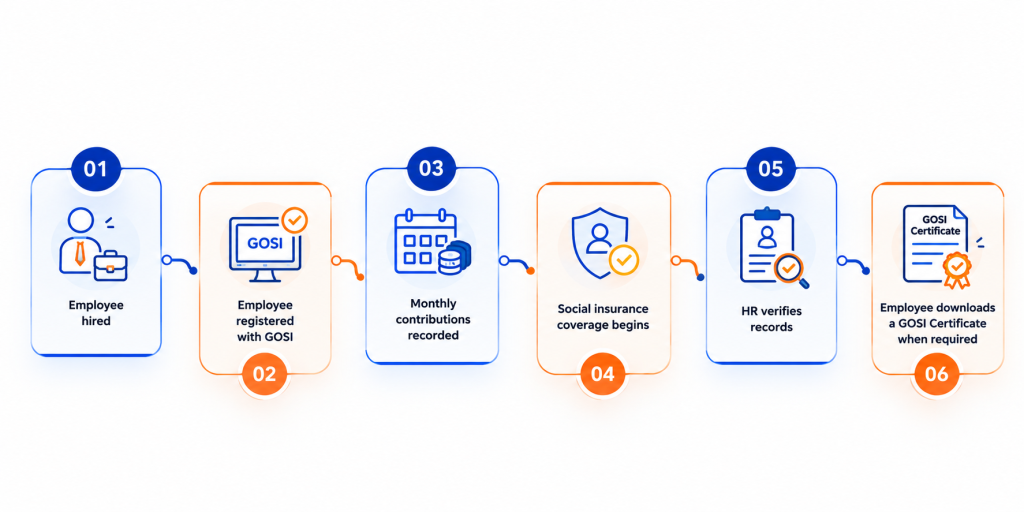
Employers must register eligible employees and maintain accurate employment and wage details. HR departments may regularly verify GOSI registration, contribution records, and payroll information. As part of wider employee compliance, HR teams may also check whether required health insurance information is activated through the relevant systems under the Council of Health Insurance (CHI). CHI health insurance and GOSI social insurance are separate requirements, although both may be reviewed during onboarding and internal compliance checks.
Before Generating a GOSI Certificate
Before requesting a certificate, confirm that:
- Your GOSI registration is active
- Your National ID or Iqama details are correct
- Your employer has registered you under the correct establishment
- Your employment and wage information is updated
- Your employer’s Commercial Registration is available, if required
- Your GOSI login credentials are working
- Recent contribution records have been processed
If an employee has changed employers, renewed an Iqama, or updated personal information, the GOSI record may need to be corrected first.
Types of GOSI Certificates
| Certificate type | Purpose | Typical user |
| Individual GOSI Certificate | Confirms an individual’s registration, wages, or contribution periods | Employee |
| Company Compliance Certificate | Shows an establishment’s registration or compliance status | Employer |
| Contribution Summary Certificate | Summarises recorded contribution information | Employee or employer |
| Employment History Certificate | Shows registered employment periods | Employee |
Always confirm which certificate the requesting authority needs. An employment history certificate may not be accepted when proof of company compliance is requested.
GOSI vs Qiwa vs Muqeem
These platforms support different parts of Saudi Arabia’s employment system.
PlatformMain purposeCommon functions
| Platform | Main purpose | Common functions |
| GOSI | Social insurance and contribution records | Registration, contributions, certificates, employment records |
| Qiwa | Labour and employment services | Employment contracts, work permits, labour services, Saudization-related processes |
| Muqeem | Residency and immigration records | Visa, residency, employee movement, and immigration services |
These platforms are not interchangeable. A Qiwa record does not replace a GOSI Certificate, and a Muqeem record does not confirm social insurance contributions.
How to Get a GOSI Certificate Online
Step 1: Visit the Official Platform
Access the official GOSI website or its electronic service platform. GOSI also provides digital services through its beneficiary and employer applications.
Step 2: Log In
Employees generally use their National ID or Iqama-linked account. Employers or representatives may need establishment credentials and proper authorisation.
Step 3: Select Certificates
Open the certificates, documents, or electronic certificate section from the dashboard.
Step 4: Choose the Certificate Type
Select the individual, company, contribution, employment history, or other certificate required.
Step 5: Generate and Download
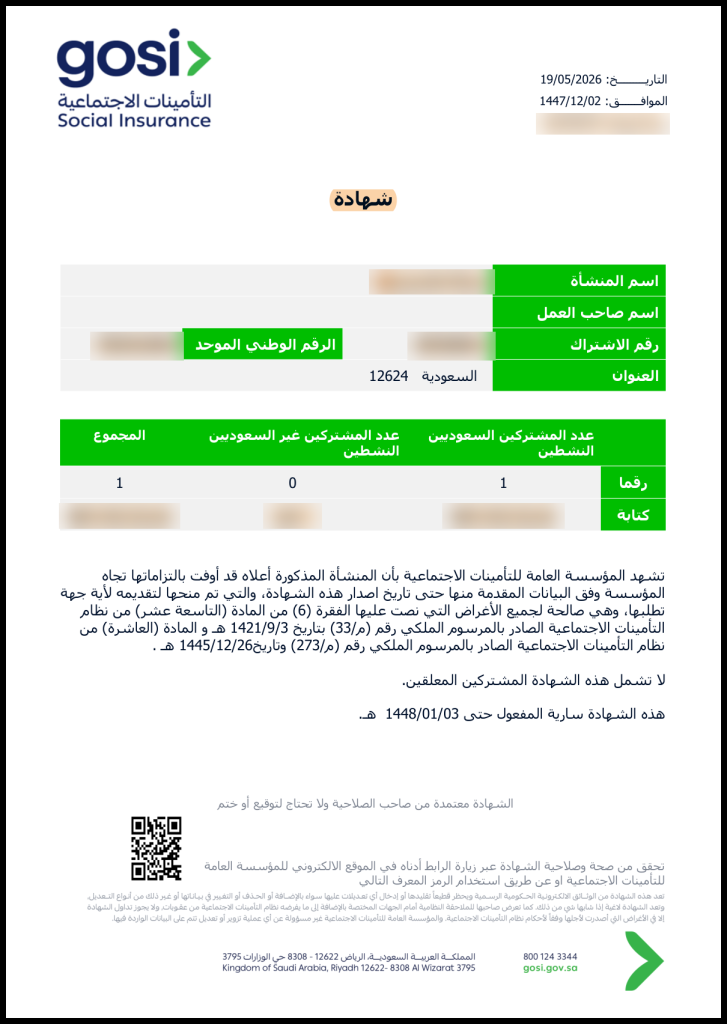
Review the displayed information, generate the certificate, and download the electronic copy as a PDF.
Step 6: Verify and Submit
Where available, verify the document using its certificate number or verification code. Submit it to the employer, HR department, government authority, bank, licensing body, or other requesting organisation.
GOSI’s online services include electronic certificate issuance and verification.
Documents and Information Required
| Information or document | Purpose |
| National ID | Identifies Saudi employees and contributors |
| Iqama number | Identifies expatriate employees |
| GOSI account details | Provides access to the user’s record |
| Employer information | Matches the employee with the registered establishment |
| Commercial Registration | May be required for company services |
| Authorisation letter | May be needed for representatives |
GOSI states that an authorised representative may need written employer authorisation for certain establishment certificate services.
How Are GOSI Contributions Calculated?
GOSI contributions are generally calculated using the contributory wage, which may include the basic salary and applicable housing allowance. The calculation depends on the employee’s nationality, insurance branch, registration date, and current regulations.
GOSI states that:
- The Annuities Branch rate is 18% of the contributory wage for applicable Saudi contributors.
- The employer pays 9%, and the employee pays 9%.
- The Occupational Hazards Branch applies to Saudi and non-Saudi employees.
- The Occupational Hazards contribution is 2% of the contributory wage and is paid by the employer.
For example, on a contributory wage of SAR 10,000, a 9% employee contribution would be SAR 900. The employer would also pay SAR 900 for its 9% share and SAR 200 for the 2% Occupational Hazards contribution, subject to the applicable rules. Payroll teams should confirm current rates, contribution ceilings, employee categories, and exemptions before calculating payments.
How Can Employees Use GOSI Benefits?
Depending on eligibility, employees may use GOSI for:
- Retirement or annuity benefits
- Occupational injury compensation
- Disability-related benefits
- Survivor or family benefits
- Unemployment-related support where applicable
- Employment and contribution verification
- Reviewing registered wages and employment periods
A certificate does not automatically grant a benefit. It provides evidence of registration and recorded information, while each benefit has separate eligibility conditions.
Employer Responsibilities Under GOSI
Employers should:
- Register eligible employees correctly
- Report accurate wages and employment details
- Pay monthly contributions on time
- Update records after transfers or resignations
- Process employee additions and removals
- Maintain payroll and contribution evidence
- Support employees requesting certificates
- Keep establishment information updated
- Cooperate with GOSI inspections
Incorrect registration, delayed updates, or unpaid contributions can affect both the employer and employee.
GOSI Compliance and Inspections
Obtaining a certificate is only one part of compliance. Inspections may review employee registration, employment periods, reported wages, payroll records, contribution payments, and establishment information.
For employees, checks may confirm whether registration, employment records, contribution entries, and HR information are correct. HR teams may also review related health insurance compliance where applicable.
For employers, inspections may examine employee lists, monthly payments, payroll records, group insurance information, and employee additions or removals. Companies should maintain contracts, payroll records, contribution evidence, and employee files throughout the year.
Processing Time, Fees, and Common Problems
Standard electronic certificates are generally issued online once the system confirms the user’s records. Delays may occur because of missing information, pending updates, authorisation requirements, or technical issues.
Downloading a standard electronic certificate is generally free through the official online service. Physical copies, attestations, special requests, or third-party assistance may involve additional charges.
Common Issues and Troubleshooting
Common problems include:
- Login failure: Check your credentials and use the official recovery process.
- Employee not registered: Contact HR or the employer.
- Missing contributions: Ask the payroll team to check whether the month has been processed.
- Incorrect details: Request an update through the employer.
- Generation error: Try again through the official website or app.
- System downtime: Wait and retry using an updated browser or application.
Conclusion
A GOSI Certificate in Saudi Arabia is more than a downloadable document. It reflects an employee’s or company’s position within the social insurance and employment compliance system. Employees should verify their registration, employment history, wages, and contributions. Employers should register employees correctly, update records, pay contributions on time, maintain supporting documents, and cooperate with inspections. Understanding GOSI alongside Qiwa and Muqeem helps employees, HR teams, and business owners manage Saudi employment compliance more effectively.
Frequently Asked Questions
1. How do I download a GOSI Certificate?
Log in to the official GOSI platform, open the electronic certificate service, select the required certificate, generate it, and download the PDF.
2. Is GOSI mandatory?
Employers must register eligible employees and follow applicable social insurance requirements. Obligations may differ according to nationality and employment category.
3. What is the difference between GOSI, Qiwa, and Muqeem?
GOSI manages social insurance, Qiwa manages labour and employment services, and Muqeem manages residency and immigration records.
4. How do HR departments use the certificate?
HR teams use it to verify registration, review employment history, support payroll checks, and prepare for audits or inspections.
5. Why can’t I generate my certificate?
Possible reasons include inactive registration, incorrect ID details, missing employer records, pending contribution updates, insufficient authorisation, or technical errors.
References:
Council of Health Insurance KSA
GOSI Certificate Home Page
Top UAE Packages


Related Articles



Top UAE Packages
Get in Touch