
How to Get a GOSI Certificate in Saudi Arabia? | A Complete Guide

Anushka
Content Writer
Anushka Basu is a business content writer specialised in global business market insights. She aims to simplify complex regulatory, financial, and business concepts into… Read more

Tulika Saxena
AVP, Sales & Marketing | IIM Nagpur
Tulika Saxena specializes in business finance, sales strategy, and market positioning. Leads growth and partnerships, ensuring seamless business setup experiences and client success across… Read more


Key Fact: GOSI provides electronic certificate services through its online platforms, allowing eligible individuals and establishments to issue and download certificates without visiting a GOSI branch. Several certificate services are available free of charge and are processed immediately.
Table of contents
- Introduction
- What Is a GOSI Certificate in Saudi Arabia?
- Who Can Get a GOSI Certificate in KSA?
- What Types of GOSI Certificates Are Available?
- How to Get a GOSI Certificate Online in KSA?
- How Can Employers Get a GOSI Certificate for an Establishment?
- What Documents or Information Do You Need?
- How Long Does It Take to Get a GOSI Certificate?
- How Do You Check or Verify a GOSI Certificate?
- What If You Cannot Get Your GOSI Certificate?
- GOSI Certificate vs Qiwa | What’s the Difference?
- Why Is a GOSI Certificate Important?
- How Can Arnifi Help With Saudi Business Compliance?
- FAQs
- Conclusion
- References
Introduction
A GOSI certificate is an electronic document issued through Saudi Arabia’s General Organisation for Social Insurance (GOSI). Depending on the applicant and purpose, it can provide information on social insurance, contributions, wages, or an establishment’s GOSI records.
The process is largely digital, so eligible users can request and download the relevant certificate online instead of visiting a GOSI branch. However, there is no single document called a “GOSI certificate” for every situation. The certificate available to you depends on whether you are accessing GOSI as an individual, contributor or employer.
If you are searching for how to get a GOSI certificate in KSA, the basic process is straightforward: access the relevant GOSI service, log in, select the certificate you need, issue it and download the electronic copy.
What Is a GOSI Certificate in Saudi Arabia?
A GOSI certificate is official electronic documentation generated through GOSI’s certificate services. Depending on the certificate selected, it can provide evidence of information held in the social insurance system.
The available certificates are not identical for every user. An individual may need a certificate showing contribution or wage information, while an employer may need documentation relating to an establishment.
Broadly, GOSI certificate services can be divided into:
- Individual or contributor certificates
- Establishment or employer certificates
- Wage-related certificates
- Contribution-related certificates
- Benefits-related certificates
- Other certificates available according to the user’s account and eligibility
The certificate required therefore depends on what the document is being used for.
Who Can Get a GOSI Certificate in KSA?
GOSI’s electronic certificate services are available to eligible users through the relevant individual or establishment services.
Individuals and contributors
Individuals who have information recorded within the GOSI system may be able to access relevant certificate services. This includes Saudi and non-Saudi contributors where the particular service applies.
For example, GOSI’s wage e-certificate service provides information relating to contribution periods and wages for eligible Saudi and non-Saudi contributors.
Employers and establishments
Businesses registered with GOSI can use establishment services to issue relevant certificates for their business.
An employer or authorised establishment user can access the appropriate business account, select the establishment and issue the required certificate electronically.
The exact certificate available depends on the user’s account, status and the service being requested.
What Types of GOSI Certificates Are Available?
GOSI provides several certificate services rather than one universal certificate.
| Certificate | What it shows / purpose |
| Wage e-Certificate | Details of contribution periods and wages |
| Contribution Certificate | Relevant contribution information |
| Establishment/Employer Certificates | Certificates issued by businesses through establishment services |
| Benefits-related certificates | Information concerning applicable insurance benefits |
| Other GOSI certificates | Additional certificates available according to the applicant’s account and service eligibility |
Not every certificate is available to every user. The appropriate option will depend on the applicant’s relationship with GOSI and the purpose for which the document is required.
How to Get a GOSI Certificate Online in KSA?
For most eligible users, getting a GOSI certificate is an online process. The exact screen names may vary depending on the service and whether you are accessing an individual or establishment account.
| Step | What to do |
| 1. Access the GOSI online service | Open the relevant GOSI electronic service |
| 2. Log in to your account | Use the appropriate individual or establishment account |
| 3. Open the Certificates section | Navigate to the certificate services available to your account |
| 4. Select the required certificate | Choose the certificate that matches your purpose |
| 5. Issue the certificate | Select the relevant option to generate or issue the document |
| 6. Review the information | Check the details shown on the certificate |
| 7. Download or save it | Download the electronic copy and retain it for your records |
For an individual certificate, the process generally begins by logging in and accessing the Certificates section. From there, the user selects the required certificate and issues it.
Once generated, the electronic certificate can be viewed, downloaded or saved. If a physical copy is needed for an administrative procedure, the electronic document can also be printed.
How Can Employers Get a GOSI Certificate for an Establishment?
The establishment process is separate from the individual contributor workflow.
An employer or authorised establishment user can generally follow these steps:
- Log in to the relevant GOSI establishment account.
- Select the required establishment.
- Open the Certificates option from the available business services.
- Select the certificate required.
- Issue the certificate.
- View or download the completed certificate.
The establishment certificate service is provided electronically, meaning an eligible employer does not need to visit a GOSI branch simply to obtain the certificate.
The service is also listed as free, with immediate processing indicated by the official service information for the applicable certificate service.
What Documents or Information Do You Need?
The information required depends on the certificate and the type of account being used. Users should avoid assuming that every GOSI certificate has the same document checklist.
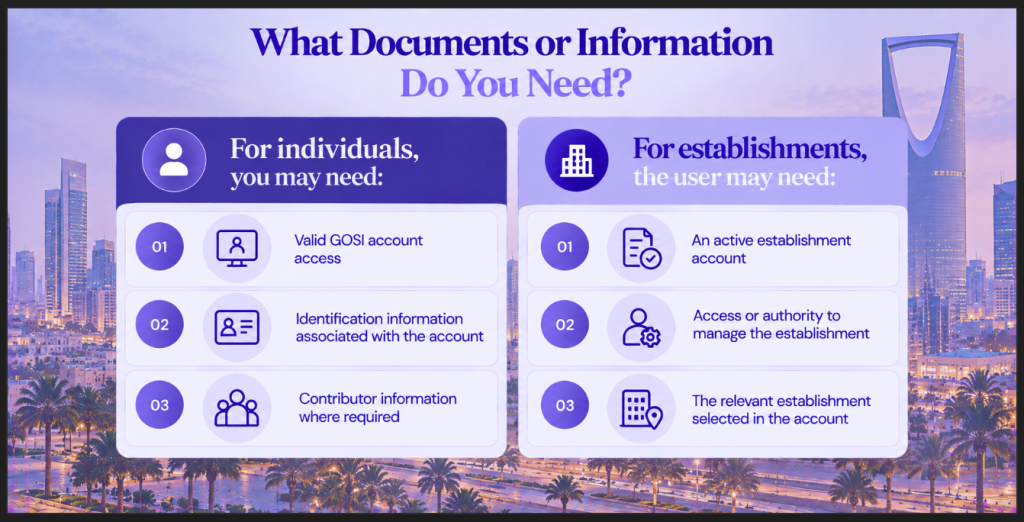
If the required certificate does not appear, the issue may relate to account status, eligibility or the specific service being accessed rather than a missing document.
How Long Does It Take to Get a GOSI Certificate?
Many GOSI electronic certificate services are designed for immediate processing. Once an eligible user has accessed the appropriate service and submitted the certificate request, the document can generally be generated and downloaded online.
This also means that users do not normally need to factor in branch-visit processing time for the electronic certificate services covered here.
How much does a GOSI certificate cost?
Several GOSI certificate services are listed as free of charge.
However, businesses and individuals should check the specific service they are using rather than assuming that every possible certificate, related service or external attestation will always be free.
How Do You Check or Verify a GOSI Certificate?
A GOSI certificate is issued electronically and may contain identifying information or reference details associated with the document.
Verification can be important when a certificate is submitted to an employer, government authority, financial institution or another organisation. The recipient may need to establish that the document corresponds to the relevant GOSI record.
Because verification procedures can vary between services, users should rely on the current GOSI verification functionality associated with the particular certificate rather than following an outdated third-party process.
What If You Cannot Get Your GOSI Certificate?
Sometimes the problem is not with the certificate itself but with the account or information associated with it.
You cannot log in
Check your account credentials and use the available account-recovery process if necessary.
Your employment or contribution information is missing
Check whether your GOSI registration and contributor information have been recorded correctly. If the issue relates to information submitted by an employer, contacting the employer or HR team may be necessary.
The required certificate does not appear
Make sure you are using the appropriate individual or establishment service. The certificate may not be available if your account or status does not meet the service requirements.
The electronic service is not working
Try accessing the service again later and check the official GOSI service channel for any available updates. If the issue continues, contact GOSI through its official support channels.
Avoid immediately submitting another request or making another payment if the original transaction appears to have gone through, but the certificate has not yet appeared.
GOSI Certificate vs Qiwa | What’s the Difference?
GOSI and Qiwa provide different types of government services in Saudi Arabia.
| GOSI | Qiwa |
| Social insurance and insurance-related services | Labour and employment-related services |
| Handles contributor and social-insurance information | Used for various employment and labour-market services |
| Provides electronic certificate services | Provides employment-related digital services |
A GOSI certificate should therefore not be treated as the same document as a Qiwa employment record or employment contract.
Why Is a GOSI Certificate Important?
A GOSI certificate can provide formal electronic documentation of information recorded within the social insurance system.
Depending on the certificate, it may be useful for:
- Employment-related procedures
- Social-insurance documentation
- Administrative applications
- Business compliance procedures
- Demonstrating relevant establishment records
- Providing official financial or contribution information where required
The specific purpose depends on the certificate being issued. A GOSI certificate should not be treated as universally mandatory for every government, employment or business procedure.
How Can Arnifi Help With Saudi Business Compliance?
Businesses operating in Saudi Arabia may need to manage several administrative and compliance requirements alongside their core operations.
Arnifi can support businesses with areas such as:
- Understanding GOSI-related administrative requirements
- Employee and corporate compliance processes
- Business establishment support in Saudi Arabia
- Documentation and ongoing compliance requirements
- Navigating Saudi regulatory procedures
Arnifi does not issue GOSI certificates on behalf of GOSI. The certificate itself is obtained through the applicable official GOSI service.
FAQs
How can I get a GOSI certificate in KSA online?
Log in to the relevant GOSI electronic service, open the Certificates section, select the certificate applicable to your account and purpose, issue it and download the electronic copy. The exact steps can vary depending on whether you are using an individual or establishment account.
Is a GOSI certificate free in Saudi Arabia?
Several GOSI electronic certificate services are listed as free. However, users should check the specific certificate service because fees can depend on the service being requested.
How long does it take to get a GOSI certificate?
Many electronic GOSI certificate services are listed as providing immediate processing. Once the eligible user completes the request, the certificate can generally be viewed or downloaded online.
Can expatriates get a GOSI certificate in Saudi Arabia?
Yes, eligible non-Saudi contributors can access applicable GOSI certificate services. For example, GOSI’s wage e-certificate service includes information for eligible Saudi and non-Saudi contributors. Availability depends on the individual’s GOSI status and the certificate being requested.
How can an employer get a GOSI certificate for a company?
An authorised establishment user can log in to the relevant GOSI business service, select the establishment, open the Certificates section, choose the required certificate and issue it electronically. The completed certificate can then be viewed or downloaded.
Conclusion
Getting a GOSI certificate in KSA is generally a digital process for eligible individuals and establishments. The exact certificate available depends on the user’s status and what the document is needed for.
For an individual, the usual route is to log in, open the certificate services, select the relevant certificate, issue it and download the document. Employers follow a separate establishment workflow when requesting company-related certificates.
Several of the electronic certificate services covered by GOSI are free and provide immediate processing. Since government platforms and service procedures can change, users should rely on the current official GOSI service when applying rather than older third-party instructions.
For businesses operating in Saudi Arabia, keeping GOSI-related requirements organised is one part of maintaining broader corporate and employee compliance.
References
Top Saudi Arab Packages
Related Articles

Top Saudi Arab Packages
Get in Touch
