
How to Check GDRFA Visa Status by Passport Number

Anushka
Content Writer
Anushka Basu is a business content writer specialised in global business market insights. She aims to simplify complex regulatory, financial, and business concepts into… Read more

Tulika Saxena
AVP, Sales & Marketing | IIM Nagpur
Tulika Saxena specializes in business finance, sales strategy, and market positioning. Leads growth and partnerships, ensuring seamless business setup experiences and client success across… Read more


Key Fact: You can check Dubai visa and immigration records through the official GDRFA status enquiry service using your passport details and other information requested by the system.
Table of contents
- Introduction
- What is GDRFA visa status?
- Can you check GDRFA visa status by passport number?
- How to check GDRFA visa status by passport number?
- What details can you check?
- What if your visa status cannot be found?
- GDRFA Visa status vs Federal Visa status
- How can you check visa status without a passport number?
- What should you check after finding your visa status?
- What are common problems when checking GDRFA visa status?
- How can Arnifi help?
- FAQs
- Conclusion
Introduction
Checking your Dubai visa status can help you confirm whether an entry permit or residence-related record is valid, track an application or identify whether further action is required.
For Dubai-issued visas, the General Directorate of Residency and Foreigners Affairs – Dubai (GDRFA) provides the official visa-status service. The service allows users to check the validity of entry permits, residence-related records and other immigration information.
One of the available enquiry options uses passport information, making it useful when you do not have an application number immediately available.
What is GDRFA visa status?
GDRFA Dubai handles immigration and residency services for the Emirate of Dubai.
Its online services cover areas such as:
- Entry permits
- Residence permits
- Visa status enquiries
- Visa cancellation
- Residency services
- Application tracking
The GDRFA Visa Status service is specifically intended to verify entry and residence permits and related records.
Visa status and visa validity are related but are not necessarily the same thing. A status enquiry may provide information about the relevant immigration record, while validity focuses on whether the visa or permit remains valid.
Can you check GDRFA visa status by passport number?
Yes. GDRFA’s current status-tracking service provides a search option using:
| Required detail | Purpose |
| Passport number | Identifies the passport record |
| Nationality | Matches the immigration record |
| Year of birth | Additional identification |
| Security verification | Completes the required security check |
The exact fields depend on the type of search selected. The current GDRFA status tracker displays passport number, nationality and year of birth as the fields for its passport-based enquiry.
Note: The visa must be associated with Dubai’s immigration system. Visas issued by other emirates are generally checked through the federal ICP platform instead.
How to check GDRFA visa status by passport number?
You can follow these steps:
1. Open the official GDRFA Dubai status service
Go to the GDRFA Dubai website and open the Visa Status or status-tracking service. GDRFA links its Visa Status service to the official online status enquiry platform.
2. Select the relevant search option
The status tracker provides different enquiry types, including application, file and passport-based searches.
3. Enter your passport details
For the passport-based search, enter the requested information, including:
- Passport number
- Nationality
- Year of birth
4. Complete the security check
Enter the verification information displayed by the system.
5. Submit the enquiry
Submit the details and allow the system to retrieve the available immigration record.
6. Review the result
Check the information displayed for your visa or related immigration record.
7. Save the result
If the service provides an option to save or print the result, keep a copy for your records.
What details can you check?
The information available depends on the type of record and enquiry being made.
You may be able to verify:
- Entry-permit information
- Residence-related information
- Visa validity
- Application-related status
- File or transaction information
- Whether further action may be required
GDRFA describes its Visa Status service as a way to verify entry and residence permits, establishment cards and other related records.
For application tracking, GDRFA also provides searches using application numbers, transaction numbers, file numbers and other identifiers.
What if your visa status cannot be found?
A missing record does not necessarily mean that your visa has a problem. Start by checking the information entered.
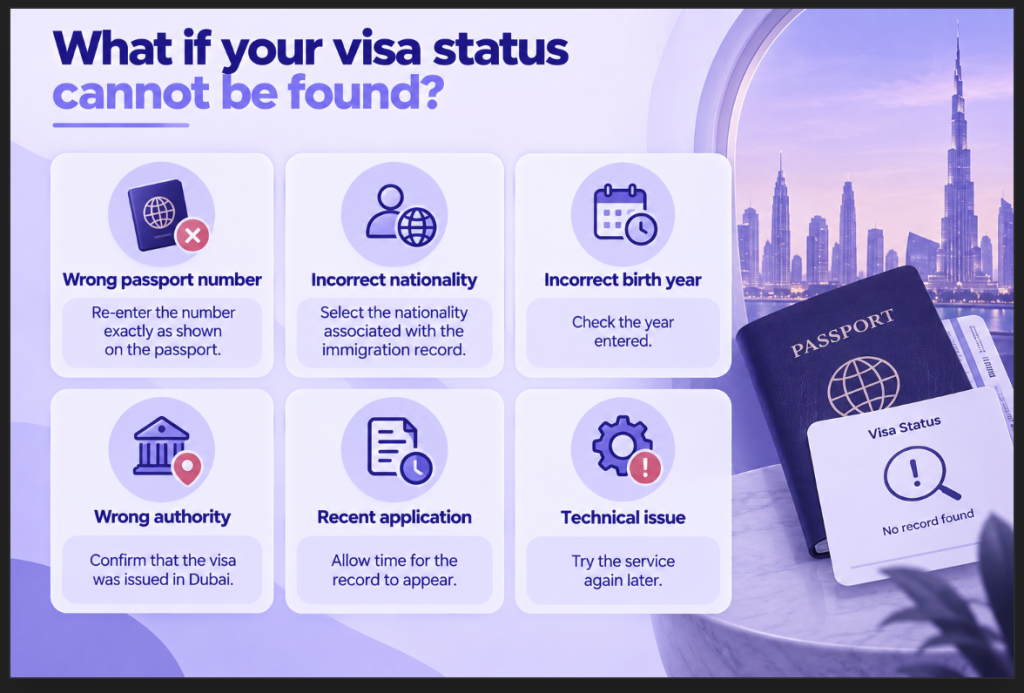
If the record remains unavailable, GDRFA Dubai provides customer support channels, including its toll-free number and Amer email support.
GDRFA Visa status vs Federal Visa status
The issuing emirate determines which immigration platform you should use.
| Visa issued in | Where to check |
| Dubai | GDRFA Dubai |
| Abu Dhabi | ICP |
| Sharjah | ICP |
| Ajman | ICP |
| Umm Al Quwain | ICP |
| Ras Al Khaimah | ICP |
| Fujairah | ICP |
The UAE Government confirms that visa application status and validity for Abu Dhabi and the other emirates listed above are checked through ICP, while Dubai uses GDRFA.
Using the wrong platform can therefore result in an unsuccessful search even when the visa itself is valid.
How can you check visa status without a passport number?
A passport number is not the only identifier available through GDRFA’s status services.
Depending on the type of record, the system may allow searches using:
- Application number
- Transaction number
- File number
- Application/file number
- Establishment number
- Other application-related information
GDRFA’s current status tracker displays several different search methods rather than relying exclusively on passport information.
For example, an applicant who has an application reference number may be able to use the application-status tracker instead. GDRFA’s application tracker asks for the application reference number along with email verification.
What should you check after finding your visa status?
Finding the record is only the first step. Check the details carefully.
Visa information
- Visa or permit type
- Current status
- Validity or expiry information
- Entry-permit details, where applicable
Personal information
- Passport details
- Nationality
- Date or year of birth
- Name information
Remaining requirements
Depending on the type of visa, check whether:
- Further immigration processing is required
- Medical procedures remain pending
- Emirates ID procedures remain pending
- Residence formalities are incomplete
Keeping a copy of the result can also make future follow-ups easier.
What are common problems when checking GDRFA visa status?
Some of the most common issues are straightforward data or platform problems.
- Incorrect passport number
- Incorrect nationality
- Incorrect year of birth
- Searching for a non-Dubai visa through GDRFA
- Recently issued information not yet appearing
- Technical problems with the online service
- Confusing application status with visa validity
If the problem continues, use the relevant GDRFA support channel rather than repeatedly submitting incorrect information.
How can Arnifi help?
Arnifi can assist businesses and individuals with Dubai visa and immigration-related procedures, including identifying the appropriate GDRFA service and supporting related documentation and follow-ups.
Support can include:
- Identifying the appropriate immigration service
- Assistance with document requirements
- Application-related support
- Status follow-ups
- Dubai visa and residency procedures
- Related UAE immigration requirements
FAQs
How can I check my GDRFA visa status by passport number?
Open the official GDRFA Dubai Visa Status service, select the appropriate passport-based enquiry and enter the requested passport number, nationality and year of birth.
Can I check my Dubai visa status online?
Yes. GDRFA Dubai provides an online Visa Status service for checking relevant entry and residence records.
What information do I need to check GDRFA visa status?
For the passport-based search, the current GDRFA system asks for your passport number, nationality and year of birth, along with the required security verification.
Why can’t I find my visa using my passport number?
Check that your passport number, nationality and year of birth are correct. You should also confirm that the visa was issued in Dubai. If the problem continues, contact GDRFA through its official support channels.
How do I check whether my Dubai visa is still valid?
Use GDRFA Dubai’s official Visa Status service to check the relevant entry or residence record and available validity information.
What is the difference between GDRFA and ICP visa status?
GDRFA handles Dubai’s immigration records, while ICP provides the relevant federal immigration services for Abu Dhabi and the other emirates.
Conclusion
Checking GDRFA visa status by passport number is a straightforward way to retrieve available information about a Dubai immigration record. The official GDRFA service can be used with the required passport details, while other enquiry methods are available for applicants with application or file information. Always confirm that the visa was issued in Dubai before using GDRFA, and rely on the official immigration service for the latest status.
Official references
Top UAE Packages
Related Articles



Top UAE Packages
Get in Touch
