
Wio Business Account | Maker-Checker Workflow Guide

Zahira Shaik
SEO Content Writer
Zahira Shaik is an SEO Content Writer and Published Author specializing in research-based content. She excels at analyzing market trends, regulations, and industry developments… Read more

Tulika Saxena
AVP, Sales & Marketing | IIM Nagpur
Tulika Saxena specializes in business finance, sales strategy, and market positioning. Leads growth and partnerships, ensuring seamless business setup experiences and client success across… Read more


Key Fact: The Maker-Checker approach for a Wio Business Account splits up payment creation and authorization in order to have dual approval in place and remove all single points of operational and financial risk for growing UAE companies.
Table of contents
- Introduction
- What Is the Maker-Checker Principle in a Wio Business Account?
- Key Roles and Responsibilities in the Maker-Checker Workflow
- How to Set Up Maker and Checker Roles in Wio Business
- Key Wio Business Account Features for Financial Management
- How Wio Business and Wafeq Simplify Vendor Payments and Accounting
- Documents Required to Open a Wio Business Account in the UAE
- Common Challenges in Business Banking and Payment Approvals
- How Arnifi Helps with Business Setup, Banking Assistance, and Compliance
- Conclusion: Building a Secure and Efficient Business Banking Workflow
- Frequently Asked Questions (FAQs)
- References
Introduction
Digital business banking radically changes corporate money management in the UAE financial market. As growing companies need robust protection of payments in order to control their increasing operational costs, the Maker-Checker approach helps prevent mistakes made manually and prevent operational fraud in the company. Dual approval will secure your company’s capital as you grow with more transactions.
The Wio Business Account system provides modern finance departments with full operational control in real time. Merging digital banking and accounting will guarantee impeccable compliance for your company. Professional incorporation services provide full security.
What Is the Maker-Checker Principle in a Wio Business Account?
The principle of Maker-Checker requires an essential four-eyes approach in all financial transactions. One individual prepares the payment request, whereas another one approves the payment separately. It ensures that there is no internal fraud and there are no typing mistakes during the transaction. The built-in control makes sure that UAE companies have complete control over their expenses.
Key Roles and Responsibilities in the Maker-Checker Workflow
Governance structures have structured systems that allocate corporate tasks to team members according to the liability policies.
Who Is the Maker (Preparer)?
The Maker drafts the payments and makes the operational inputs without release authority.
- Enters vendor invoices and supplier mass payment information.
- Drafts the monthly WPS payroll batches.
- Drafts the transaction requests and submits them to the system review queue.
Who Is the Checker (Approver)?
The Checker has the approved authority to release corporate funds.
- Checks the beneficiary bank information from the original corporate invoices.
- Checks the transaction amount and the current company ledger balance.
- Approves or rejects the transaction requests accordingly.
How Does the Maker-Checker Process Work?
- The preparer drafts the digital payment request on the platform.
- The platform notifies the authorized approvers about pending transactions.
- The checker reviews all the transaction credentials submitted.
- The checker approves the validated transactions by verification.
- The system releases corporate funds through secure banking rails.
How to Set Up Maker and Checker Roles in Wio Business
Setting multi-user permissions on your Wio Business Account requires appropriate administrative system permissions.
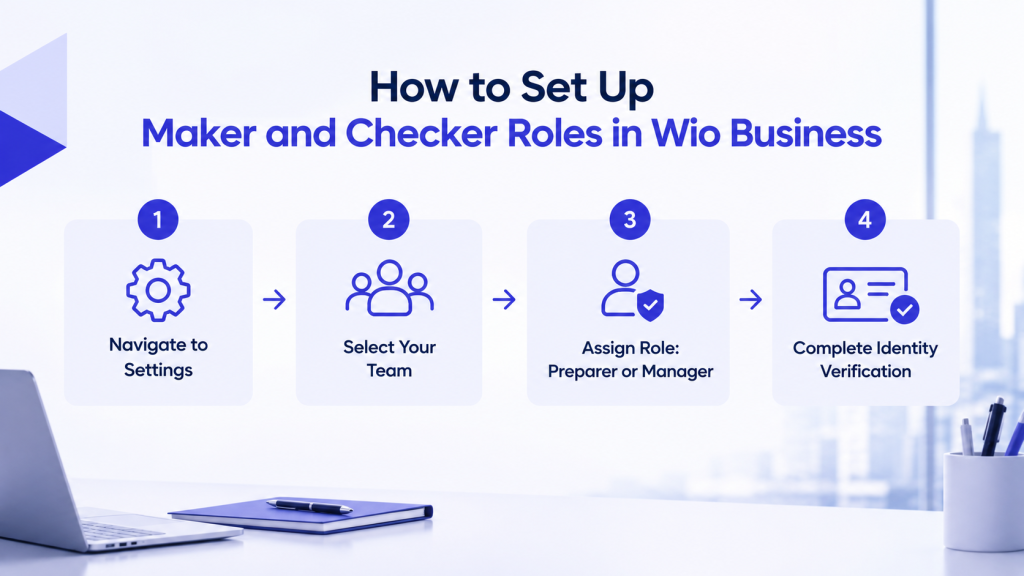
How to Add a Maker (Preparer)
By giving a Preparer permission, you enable operational personnel to handle invoice entries in a secure manner.
- Start the software and go to Settings, Accounts, Your Team.
- Invite a new corporate team member.
- Set all necessary profile parameters and assign the specific Preparer permission.
- Send an invitation to your user for the standard identity verification process.
How to Add a Checker (Manager or Joint Signatory)
Checkers have a higher permission level to verify corporate releases of funds.
- Go to the Team Management settings to invite your executive approver.
- Choose a Manager permission or set up the Joint Signatory arrangement.
- Complete corporate verification steps to adhere to all necessary signatory requirements.
How to Manage Payment Approvals After Setup
Preparers will make the transaction request, while Checkers check the outstanding items. The approvers will either decline the wrong file or approve the legitimate transfer in a secure way. Finance managers need to verify spending limitations before the transfer.
Key Wio Business Account Features for Financial Management
The digital account provides multi-user access features that are meant for growing enterprise teams. The accounts include multi-currency balances in AED, USD, EUR, and GBP. Saving spaces are provided separately to ensure that the working funds are not confused with daily expenses. The wage protection system streamlines the processing of payroll batches. Essential and Grow subscription plans cost AED 99 and AED 249 respectively per month. It is important to have a working Wio Business Account.
How Wio Business and Wafeq Simplify Vendor Payments and Accounting
Connecting your Wio Business Account to Wafeq accounting software makes sure there are no duplicate entries.
Invoice Capture and Payment Preparation
Bills are directly uploaded into the automated accounting software. The embedded artificial intelligence system immediately captures line items, VAT rate, and vendor amount.
Maker-Checker Approval for Vendor Payments
The bills captured will then be sent through an internally designed approval process, where the validity of the bill is verified before passing onto the bank queue.
Payment Release and Bank Reconciliation
Authorization codes are used to release the banking rails from the accounting software, which automatically reconciles transactions through a real-time statement feed.
Security and Beneficiary Management
New corporate beneficiaries must have a mandatory cooling-off period. Biometric security systems prevent any unauthorized changes to the payees.
Documents Required to Open a Wio Business Account in the UAE
Corporate bank setup requires valid company registration papers.
- Valid UAE trade licence issued by mainland or free-zone authorities.
- Memorandum of Association and official corporate constitutional files.
- Passports and Emirates IDs for shareholders and authorized signatories.
- Proof of corporate address and tenancy contract documentation.
Incomplete documentation leads to unexpected delays in the compliance review process. Non-disclosure of signatories delays the verification process. Incomplete descriptions of activities generate detailed inquiries from banks regarding the source of funds.
Common Challenges in Business Banking and Payment Approvals
Payment processes by single users put companies at serious risk of losing money. Manual posting of invoices generates duplicate payments in active accounts. Lack of clear approval responsibilities causes delays in paying vendors when processing is at its height.
How Arnifi Helps with Business Setup, Banking Assistance, and Compliance
The creation of a compliant legal entity makes future corporate banking applications easier.
Company Formation and Licensing Support
Arnifi is a full-service commercial incorporation firm serving mainland UAE and free zone companies. Professional advice is provided for trade licensing to make your banking applications quicker.
Corporate Banking Assistance
Arnifi helps you put together the necessary documents in order to comply with bank regulations. Professional support ensures your quick approval through regional banks.
Accounting, Tax, and Ongoing Compliance
Arnifi offers accounting, VAT submissions, and corporate taxation services. Proper accounting will improve your enterprise’s payment process.
AML Screening and HR Support
Arnifi provides compliance checks along with Employer of Record services. The combination of both ensures proper corporate governance throughout all aspects of your enterprise.
Conclusion: Building a Secure and Efficient Business Banking Workflow
Liquidity is safeguarded by separating the preparation of the payment from its actual authorization. The use of the Wio Business Account, together with the associated accounting application, guarantees maximum efficiency.
Frequently Asked Questions (FAQs)
1. What is a Maker-Checker workflow in a Wio Business Account?
It is a two-person authorization process where one user initiates a payment, and the second one confirms it.
2. What is the difference between a Maker and a Checker?
The Maker is responsible for inputting payment information, while the Checker verifies it and confirms the final payment.
3. How do I set up Maker and Checker roles in Wio Business?
Go to Settings > Your Team, invite a team member, and give them either the Preparer or Manager role.
4. Can a Preparer approve their own payments?
No, they must be authorized by a user with appropriate permissions to confirm a transaction.
5. Can I assign different payment approval limits to team members?
Yes, you can change your payment limits and other parameters depending on your company hierarchy.
6. Does Wio Business support multiple users and authorized signatories?
Yes, it allows you to manage multiple users and signatories in your company.
7. Can Wio Business Maker-Checker controls be used for payroll?
Yes, Preparers can create a WPS payroll batch for the Manager to approve it prior to submission.
8. Can I connect Wio Business with Wafeq for vendor payments?
Yes, the integration facilitates automatic bill synchronization, payment generation, and automatic reconciliation.
9. What documents are required to open a Wio Business Account in the UAE?
Required documents include a valid trade licence, MOA, Emirates IDs, shareholder passports, and address proof.
10. How does Arnifi help businesses with UAE corporate banking?
Arnifi provides legal incorporation, document preparation, and banking setup assistance to improve application readiness.
References
- Central Bank of the UAE (CBUAE) Financial Regulations – https://www.centralbank.ae/
- UAE Ministry of Economy Corporate Frameworks – https://www.moec.gov.ae/
- Wio Bank Business Solutions – https://wio.io/business/
- Arnifi Corporate Services – https://arnifi.com/
Top UAE Packages
Related Articles



Top UAE Packages
Get in Touch
