
Muqeem Portal Login & Visa Status Check 2026

Anushka
Content Writer
Anushka Basu is a business content writer specialised in global business market insights. She aims to simplify complex regulatory, financial, and business concepts into… Read more


Key Facts: Muqeem is mainly used by Saudi employers and authorised establishments to manage expatriate Iqama, visa, exit-reentry, final-exit, and employee records. Individuals should generally use Absher for personal status checks and verify visa validity before travel.
Table of contents
- Introduction
- What Is Muqeem?
- Muqeem Portal Login
- How to Register for Muqeem?
- How to Check Visa Validity on Muqeem?
- Step-by-Step Process
- What Your Results Mean?
- How to Check Exit/Re-Entry Visa Status?
- How to Check Iqama Status on Muqeem?
- Muqeem Services
- Final Exit
- Employee Reports
- Travel Records
- Muqeem vs Absher vs Qiwa
- Muqeem Login Problems & Solutions
- Muqeem Visa Status Problems & Solutions
- Muqeem Fees & Subscription Packages
- Frequently Asked Questions
Introduction
Muqeem is a Saudi digital platform used mainly by employers, establishments, and authorised representatives to manage expatriate-resident services, including Iqama, exit/re-entry visas, final-exit visas, and employee reports. Individuals who only need to check an exit/re-entry visa can use the official Absher Exit/Re-Entry Visa Status service. This official service shows exit/re-entry visa details, including relevant visa information and last entry.
What Is Muqeem?
Muqeem is a Saudi government e-service solution targeting establishments to carry out transactions with non-Saudi employees and residents online. It facilitates various services that include renewing the Iqama, issuing the exit/re-entry visa, final-exit visa, employee information, and reports related to travel. It is not intended for use by employers, HR, establishment representatives, or authorised establishment representatives, as a general personal portal for all employees.
Muqeem Portal Login
Official Muqeem Login
Use the official portal. Avoid entering Iqama, passport, or company information on unofficial “visa-check” websites.
How to Log In
- Open the Muqeem portal
- Select the establishment login option
- Enter authorised account credentials
- Complete Nafath or OTP verification if requested
- Access employee, Iqama, visa, and report services
Who Can Log In?
Muqeem logins are generally for:
- Employers
- Registered establishments
- Authorised company users
- HR and PRO teams
- Government-approved representatives
Can Employees Log In?
Employees generally should not assume they can create an establishment-level Muqeem account. For personal visa, Iqama, and exit/re-entry checks, Absher Individuals or the official visa-status enquiry service is usually more appropriate.
How to Register for Muqeem?
Requirements
A business generally needs an eligible Saudi establishment record, authorised representative details, valid contact information, and access to the relevant government identity-verification process.
Registration Steps
- Confirm the establishment is eligible
- Select the Muqeem subscription or service package
- Provide establishment and authorised-user information
- Complete required verification
- Activate the account
- Add authorised company users where permitted
Nafath Verification
Nafath may be used to confirm the identity of the authorised person handling the establishment account.
Activation
After verification and subscription activation, the establishment can access available Muqeem services. Confirm current registration steps and fees directly through Muqeem before payment.
How to Check Visa Validity on Muqeem?
Information You Need
Depending on the service, you may need:
- Iqama number
- Visa number
- Passport number
- Date of birth
- Iqama expiry date
- Visa expiry date
Step-by-Step Process
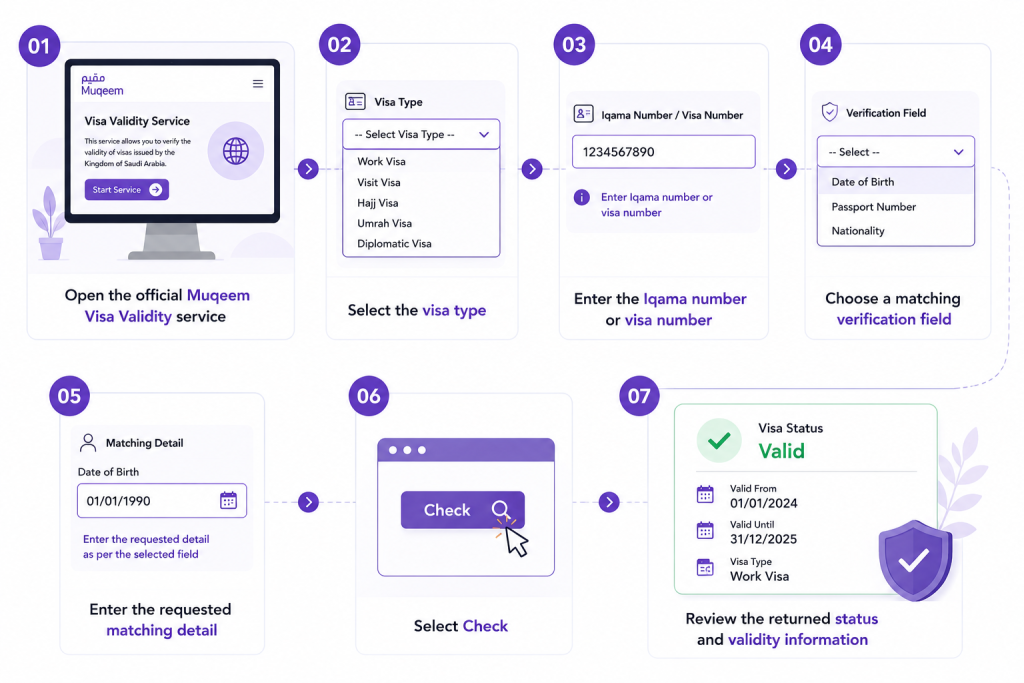
What Your Results Mean?
- Active/valid: The visa is currently usable within its stated conditions
- Used: The related entry or travel action may already have been recorded
- Expired: The visa validity period has ended
- Cancelled: The visa is no longer valid for travel
Always check the dates, visa type, and return conditions, not only the visible status.
How to Check Exit/Re-Entry Visa Status?
Single vs Multiple
A single exit/re-entry visa normally permits one departure and return within its validity. A multiple exit/re-entry visa allows multiple trips during the stated period.
Return Before Date
The return-before date is the deadline by which the resident must return to Saudi Arabia. Missing this deadline can affect residency and future travel.
Expiry Date
Check whether the visa is valid by date or duration. The result should be read with the relevant issue date, return date, and Iqama validity.
Active vs Used vs Expired
The official Absher service allows beneficiaries to view exit/re-entry details for workers, including visa information and their last entry into Saudi Arabia.
How to Check Iqama Status on Muqeem?
Employers can use Muqeem services to review expatriate employee records, including Iqama-related details, renewals, and reports. Individual employees should use Absher for their own personal Iqama details where available.
Muqeem Services
Iqama Services
- Iqama issuance and renewal
- Resident-data updates
- Employee record management
Visa Services
- Exit/re-entry visa processing
- Visa extension or cancellation where applicable
- Visa-status and validity checks
Exit/Re-Entry Services
Employers can issue and manage exit/re-entry visas for eligible employees through authorised channels.
Final Exit
Establishments may process final-exit visas for employees, subject to the applicable Saudi labour and immigration requirements.
Employee Reports
Muqeem can help establishments generate employee, residency, visa, and travel-related reports for HR and compliance purposes.
Travel Records
Employers may review relevant entry, exit, and travel information for their sponsored employees.
Muqeem vs Absher vs Qiwa
| Platform | Primary users | Main purpose |
| Muqeem | Employers and authorised establishments | Expatriate employee, Iqama, visa, exit/re-entry, and report services |
| Absher | Saudi citizens, residents, employers | Personal and government services, including exit/re-entry status enquiries |
| Qiwa | Employers and employees | Employment contracts, labour services, work permits, and workforce management |
| Jawazat | Government authority | Passport, residency, and immigration administration |
Muqeem helps establishments manage residency-related employee transactions. Absher is more suitable for individual personal services. Qiwa focuses on labour and employment processes.
Muqeem Login Problems & Solutions
| Problem | What to check |
| Incorrect username or password | Reset credentials through official account recovery |
| Nafath or OTP failure | Confirm the registered mobile number and authorised user identity |
| Account inactive | Check subscription, establishment status, or authorisation |
| User lacks access | Ask the establishment administrator to review user permissions |
| Browser or loading issue | Use an updated browser and clear cache |
| Establishment data mismatch | Check company records with the relevant Saudi authority |
Never share Muqeem passwords or OTPs with unauthorised people.
Muqeem Visa Status Problems & Solutions
| Problem | Possible reason |
| No visa record found | Incorrect Iqama, visa number, or matching identifier |
| Details do not match | Date of birth, passport number, or expiry information may be incorrect |
| Visa appears expired | Return deadline or visa validity may have passed |
| Status has not updated | Recent issuance, renewal, cancellation, or travel data may still be processing |
| Employee cannot check through Muqeem | Use Absher or ask the employer’s authorised representative |
Muqeem Fees & Subscription Packages
Muqeem is generally an establishment subscription service, and packages may vary by employee volume, service level, and selected features. Charges can differ between basic, advanced, and professional packages, and may change over time. Businesses should check the official Muqeem portal for current subscription options, user limits, included transactions, and payment terms before subscribing. Do not rely on unofficial pricing pages.
Frequently Asked Questions
1. What is Muqeem in Saudi Arabia and what is it used for?
Muqeem is an establishment-focused Saudi digital platform for managing expatriate employee residency, Iqama, visa, exit/re-entry, final-exit, and reporting services.
2. What is the Muqeem portal and who can use it?
It is mainly for employers, authorised establishments, HR teams, and PROs. Employees should normally use Absher for personal enquiries.
3. How do I register for the Muqeem portal?
An eligible establishment selects a package, provides authorised-user details, completes verification, and activates access through the official Muqeem process.
4. What are the requirements to create a Muqeem account?
Requirements generally include an eligible establishment, authorised representative, government-verified identity, active contact details, and an appropriate subscription.
5. What is the MOI number in Muqeem registration?
The MOI number is generally an establishment or ministry reference used to identify the business in government systems. Confirm the exact number required during registration with Muqeem support.
6. Who can log in to Muqeem?
Employers, authorised representatives, HR teams, and establishment users with approved access can log in.
7. What is the difference between Muqeem, Absher, Jawazat, and Qiwa?
Muqeem supports establishment immigration transactions; Absher supports personal government services; Jawazat is the immigration authority; Qiwa supports labour and employment services.
8. What is a Muqeem Paper in Saudi Arabia?
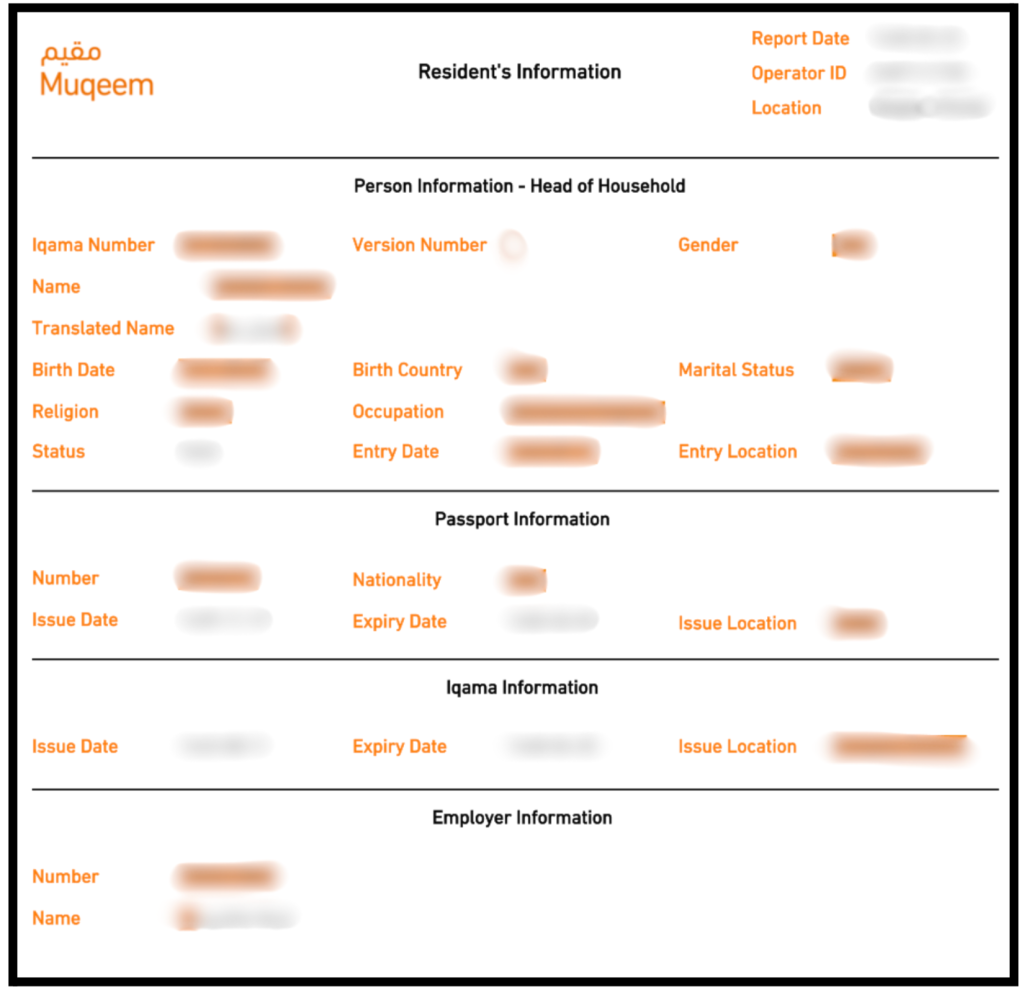
“Muqeem Paper” commonly refers to a printed Muqeem report or residency-related document generated through an authorised establishment account. The exact document depends on the purpose and available service.
9. What is a Muqeem Report?
A Muqeem report may contain employee residency, visa, entry/exit, or Iqama-related information, depending on the report selected.
10. How can I get a Muqeem Paper online?
Ask the employer, HR department, or authorised Muqeem user to generate and print the appropriate report. Individual access may not be available for all report types.
11. Can I get or print a Muqeem Paper from Absher?
Absher provides personal services, but it may not provide the same employer-generated Muqeem report format. Use the correct official channel according to the document requested.
12. Can I get a Muqeem Paper if I am outside Saudi Arabia?
If the employer’s authorised representative can access the establishment account, they may be able to generate an available report. The employee’s physical location does not necessarily prevent report generation.
13. How do I download or print a Muqeem Report?
Authorised Muqeem users can select the relevant report, review the employee information, and download or print it from the establishment portal.
14. What is the reference number on a Muqeem print/report?
It is a system-generated reference used to identify or verify the specific report or transaction.
References:
Top UAE Packages

Related Articles
Top UAE Packages
Get in Touch