
SIRA Approval in Dubai | Requirements and Application Process

Anushka
Content Writer
Anushka Basu is a business content writer specialised in global business market insights. She aims to simplify complex regulatory, financial, and business concepts into… Read more

Tulika Saxena
AVP, Sales & Marketing | IIM Nagpur
Tulika Saxena specializes in business finance, sales strategy, and market positioning. Leads growth and partnerships, ensuring seamless business setup experiences and client success across… Read more


Key Fact: SIRA approval requirements depend on the security activity and applicable licensing framework. Businesses must identify the correct approval category, submit the required documents and meet relevant conditions before conducting regulated activities.
Table of contents
- Introduction
- What Is SIRA Approval in Dubai and Why Is It Required?
- Which Businesses Need SIRA Approval in Dubai?
- What Are the Requirements for SIRA Approval in Dubai?
- What Documents Are Required for SIRA Approval?
- How Do You Apply for SIRA Approval in Dubai?
- How Much Does SIRA Approval Cost in Dubai?
- How Long Does SIRA Approval Take and When Must It Be Renewed?
- What Happens If a Business Operates Without Required SIRA Approval?
- What Mistakes Should Businesses Avoid When Applying for SIRA Approval?
- How Can Arnifi Help With SIRA Approval in Dubai?
- FAQs
- Conclusion
- Official References
Introduction
The Security Industry Regulated Agency holds the power to oversee security-related activities and licensing requirements. SIRA Approval in Dubai is very important for businesses that operate in regulated areas of the security industry. So before you think of starting a business, you should confirm which approvals are required and prepare documents accordingly. Processing stages, fees, and renewal applications often come along with the associated activity chosen.
What Is SIRA Approval in Dubai and Why Is It Required?
SIRA, or the Security Industry Regulatory Agency, regulates security services and related activities in Dubai. Under Dubai’s security industry framework, businesses providing regulated security services must obtain the appropriate SIRA licence. A commercial licence and SIRA approval serve different purposes, so obtaining one does not automatically satisfy the requirements for the other.
SIRA approval may be relevant to businesses involved in:
- Security guarding and specialised security services.
- Security systems installation and maintenance.
- Trading in regulated security devices and equipment.
- Security training and consultancy.
- Security protection planning and other activities covered by the applicable framework.
The exact requirements depend on the proposed activity. Businesses should confirm the relevant category with SIRA and the licensing authority before committing to a company structure or beginning operations.
Which Businesses Need SIRA Approval in Dubai?
SIRA requirements can apply to businesses providing security services or working with regulated security equipment and systems. The following table outlines common examples and the considerations involved.
| Business activity | What to check |
| Security guarding | Relevant security activity licence, personnel requirements and training |
| Security systems installation | Technical qualifications, approved systems and applicable certification requirements |
| Security equipment trading | Product approvals and activity-specific licensing conditions |
| Security consultancy | Professional qualifications, experience and the relevant consultancy activity |
| Security training | Trainer qualifications and applicable approval conditions |
| Specialised security services | Additional conditions relating to the particular service |
These examples are not exhaustive. Dubai’s security industry legislation and its current implementing regulation define the scope of regulated security activities, including relevant security services, personnel, training, equipment sales and installation, and security consultancy. Businesses should verify their exact activity and applicable approval requirements with SIRA and the relevant licensing authority before commencing operations.
What Are the Requirements for SIRA Approval in Dubai?
Initial approval and commercial licensing
The first step is to identify the business activity and establish the correct licensing route. Depending on the application, SIRA may require a trade name reservation, initial approval documentation, an existing trade licence or a no-objection letter from the relevant free zone.
Ownership and company details
Applicants should be prepared to provide company and ownership information. Identity documents and other records may be required depending on the application stage and the people involved.
Technical and operational conditions
Certain activities require qualified personnel, approved training, equipment certification, security plans or inspection reports. Some activities may also have premises-related requirements or require additional approvals from another authority.
For example, SIRA’s security system certification service requires an approved Security Plan Certificate and a successful security audit report for relevant applications. These conditions should not be treated as universal requirements for every security activity.
The applicable checklist should be confirmed before the application is submitted.
What Documents Are Required for SIRA Approval?
The documentation depends on the approval category, but businesses can use the following list as a starting point:
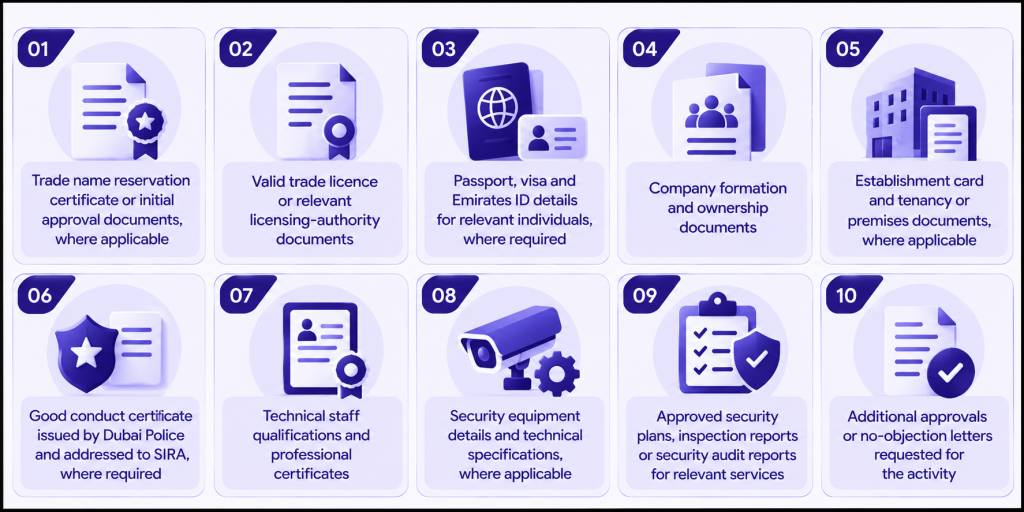
Do not assume every item is mandatory for every application. For instance, SIRA’s security system certification service specifies documents that include an initial business name reservation and initial approval receipt, or a trade licence, along with the required security plan and audit documentation. The checklist differs from that of a security activity licence.
How Do You Apply for SIRA Approval in Dubai?
The application process varies by activity, but the general sequence involves confirming the category, preparing documents and completing the relevant online service.
| Step | What to do |
| 1. Confirm the activity | Identify the proposed security service and check whether SIRA approval is required. |
| 2. Check the company setup stage | Establish whether initial approval, a commercial licence or another prerequisite is needed. |
| 3. Register on the portal | Register on the SIRA e-services portal where applicable. |
| 4. Complete the application | Enter the company details and information relevant to the chosen activity. |
| 5. Prepare documents | Collect the required licensing, identity, technical and supporting documents. |
| 6. Submit the request | Apply through the relevant service and pay the applicable fee. |
| 7. Meet additional conditions | Complete personnel, premises, equipment or inspection requirements where applicable. |
| 8. Track the application | Monitor its status and respond to requests for further information. |
| 9. Complete the process | Obtain the required approval before starting regulated operations. |
SIRA’s New Security License service outlines the online application process and lists activity-specific conditions. Portal registration or application submission alone does not mean approval has been granted.
How Much Does SIRA Approval Cost in Dubai?
SIRA service fees
There is no single fee for every SIRA approval. The total depends on the selected activity, the service requested and any additional licensing or operational requirements. SIRA’s published service pages provide the following examples:
| Official service | Service fee | Knowledge fee | Innovation fee | Combined total |
| New Security License | ~AED 100 | ~AED 10 | ~AED 10 | ~AED 120 |
| Renew Security License | ~AED 100 | ~AED 10 | ~AED 10 | ~AED 120 |
| New Security System Certification | ~AED 100 | ~AED 10 | ~AED 10 | ~AED 120 |
These amounts apply to the named services, not the complete cost of establishing a security business. SIRA’s New Security License page also lists activity-specific charges, including ~AED 4,020 for security equipment and equipment trading and ~AED 5,020 for security training. Check the relevant official SIRA service details for the applicable activity and current charges.
Other costs to include in the budget
The wider setup budget may include commercial licensing, premises, technical equipment, staff training, professional services and other compliance expenses. Businesses should distinguish SIRA-specific fees from company formation and operating costs when estimating the total investment.
How Long Does SIRA Approval Take and When Must It Be Renewed?
Processing timelines
SIRA’s service pages publish processing estimates of two business days for certain services, including the New Security License and New Security System Certification. Dubai’s 2026 implementing regulation also provides for a decision on a company security licence application within three working days after the relevant conditions and requirements have been met.
The applicable timeline depends on the service, the completeness of the application and whether additional requirements must be satisfied. These timeframes should not be treated as guarantees for completing the entire company setup process.
Renewal obligations
Renewal requirements depend on the licence, certificate or personnel approval involved. Under Dubai’s current implementing regulation, a company security licence is valid for one year, and the renewal application must be submitted at least 30 days before the licence expires.
Businesses should confirm the validity period and renewal conditions for each additional approval, update the required documents, complete outstanding inspections where applicable and pay the relevant fees.
SIRA’s Renew Security License service lists two business days for that service. This should not be confused with the validity period of the licence itself. Businesses must check the applicable expiry date and renewal requirements rather than assume that all SIRA approvals follow the same schedule.
What Happens If a Business Operates Without Required SIRA Approval?
Dubai’s security industry framework prohibits providing regulated security services without the appropriate licence. Businesses should confirm their approval status before offering services or engaging another provider to perform regulated work.
Operating without the required approval may lead to:
- Regulatory enforcement under the applicable rules.
- Financial penalties where prescribed by the relevant provisions.
- Delays or disruption to business operations.
- Problems renewing related licences or completing other regulatory procedures.
The consequences depend on the activity and circumstances. Businesses should refer to the applicable legislation and official authority guidance rather than rely on unverified penalty amounts.
What Mistakes Should Businesses Avoid When Applying for SIRA Approval?
| Common mistake | How to avoid it |
| Assuming a commercial licence is sufficient | Confirm the separate SIRA requirements for the activity |
| Choosing the wrong business activity | Verify the activity and its approval conditions before applying |
| Submitting incomplete documents | Check the current service-specific checklist |
| Overlooking technical requirements | Confirm personnel, equipment and premises conditions early |
| Using outdated fee estimates | Check the latest official service page |
| Starting operations too early | Wait until the required approval has been granted |
| Missing renewal deadlines | Track expiry dates and prepare renewal documents in advance |
How Can Arnifi Help With SIRA Approval in Dubai?
Arnifi can help businesses plan their Dubai company formation and understand the licensing steps relevant to their proposed activity. Support may include identifying applicable requirements, organising documentation and coordinating administrative stages.
Planning these requirements early can help business owners identify potential gaps before submitting applications. However, SIRA and the relevant licensing authorities retain responsibility for assessing applications and granting approvals.
FAQs
1. What is SIRA approval in Dubai?
SIRA approval is a licence, certificate or other authorisation required for certain regulated security activities in Dubai. The specific requirement depends on the service or business activity.
2. Which businesses need SIRA approval in Dubai?
Security service providers, security systems businesses, security equipment traders and certain security consultancies may need approval. The exact requirement depends on the activity and applicable rules.
3. What documents are required for SIRA approval?
Documents may include trade name reservation or trade licence records, ownership details, identity documents, good conduct certificates, technical staff qualifications and activity-specific supporting documents.
4. How much does SIRA approval cost in Dubai?
Fees vary by service and activity. Some published SIRA services list ~AED 120 in combined service, knowledge and innovation fees, while additional activity-specific charges and company setup expenses may apply.
5. How long does SIRA approval take, and when must it be renewed?
Some SIRA services list a two-business-day processing estimate, while company security licence decisions may take up to three working days after requirements are met. Company security licences are valid for one year and must be renewed at least 30 days before expiry.
Conclusion
The main priority of a business when it comes to getting a SIRA approval in Dubai is to have all the necessary documents prepared, identify the correct activity for the chosen business and meet applicable licensing conditions without fail.
Processing timelines, costs & fees and renewal obligations vary from service to service, which makes official verification essential if you are planning for company formation and licensing requirements in Dubai. Arnifi can help you plan before you begin regulated operations.
Official References
Top UAE Packages
Related Articles


Top UAE Packages
Get in Touch
